
Sometimes, Hollywood movie screenwriters see the future. Who would have thought 20 to 30 years ago that we’d be able to order groceries online and authenticate documents digitally? Digitalization came slowly but has dominated the world in this post-Corona era. Businesses are coming online and selling their products and services online. In this era, ecommerce is becoming essential for businesses. If you are running or managing a business and have an ecommerce store, you know that selling products online requires effort. But if your online store is not getting enough traffic or sales, you may be feeling stuck.
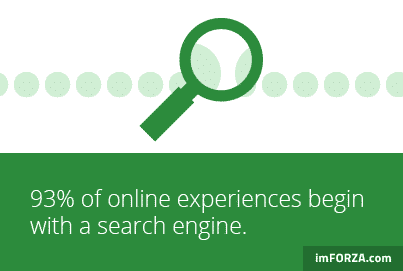
You may have a great website, amazing products, and a solid marketing plan, but without good visibility on search engines, your store will struggle to grow. Appearing in search engine results pages (SERPs) becomes important because 93% of all Internet experiences still begin with a search engine. This is where an ecommerce SEO audit comes in. An ecommerce SEO audit is like a health checkup for your eCommerce website. It helps you determine what’s working and what’s not, revealing issues hindering your eCommerce website and developing a clear plan for fixing them. In this article, we’ll tell you everything you need to know about an ecommerce SEO audit and how to get started with it.
What is an Ecommerce SEO Audit?
An ecommerce SEO audit is an in-depth examination of your online store to see it’s performance of search engine optimization (SEO). Simply, it is like a health checkup for your website, helping you find how easily search engines like Google can find and rank your store. During an audit, we look at a few key things:
- On-page SEO: This is everything that happens on your website itself, like the content on your product pages, how well your images load, and how easy it is for people to find what they’re looking for.
- Technical SEO: This involves checking if your website has any behind-the-scenes issues, like broken links, core web vitals, slow loading times, markup schemas, or if search engines can properly crawl and understand your pages.
- Off-page SEO: This is about the reputation your website builds online. For example, do other websites link back to yours? Links from trusted sites can boost your rankings.
Although running an ecommerce SEO audit can be time-consuming, it is worth it. Want to know how? The next part is for you.
Why Is an Ecommerce SEO Audit Important?
An ecommerce SEO audit is important because it helps your online store get noticed by more people. Think about it: If your store isn’t showing up on the first page of Google, potential customers might never find it. It is also a fact that 75% of users never go beyond the first page of search results. So, in today’s online world, being visible is key to success. Running an ecommerce SEO audit helps you make sure that your website is set up in the best way to show up in search engine results. When you improve your site’s SEO, you can enjoy a lot of benefits, like:
- More traffic: Less technical issues will help you rank better and attract more visitors. By ranking higher in search results, more people will visit your site. This can lead to more customers finding your products.
- Better user experience: SEO audits help you spot and fix problems that could make your eCommerce website hard to use, like slow loading times or broken links. A smooth website means people are more likely to stay and buy from you.
- Increased sales and revenue: The more people visit your ecommerce store and the easier it is for them to find what they need, the more likely you are to make sales.
- Competitive advantage: In a crowded online market, doing an SEO audit helps you stand out from competitors. If you improve your SEO, you can get ahead of others who aren’t paying attention to it.
- Lower marketing costs: When you rank higher on search engines, you don’t have to spend as much money on ads. People find you naturally, which saves you money and helps your business grow without heavy marketing expenses.
So, an ecommerce SEO audit can give you a big boost by helping your eCommerce store perform better, attract more visitors, and ultimately make more sales. It’s a smart move for anyone looking to grow their online store in the long run.
How Often Should You Conduct an Ecommerce SEO Audit?
Knowing when to conduct an ecommerce SEO audit for your website is important to keep your store healthy and performing well. The frequency of these audits depends on the size of your website, how often things change, and the level of competition in your industry. Here’s a simple guide to help you understand when to do an SEO audit:
1. Full ecommerce SEO audit: at least once a year
A full SEO audit is like a deep clean for your website. It checks everything, from technical issues to how well your content is doing. If your store is small and doesn’t change much, a yearly audit might be enough to keep things running smoothly.
2. Regular check-ups: every few months
Ecommerce websites normally have products, categories, and important pages like policies, about us, etc. It’s a good idea to review these every 3-6 months to ensure your content is up to date and optimized for search engines.
3. Frequent monitoring: weekly or monthly
For stores in competitive industries or with frequent updates, more regular audits are helpful. These can be quick reviews to catch and fix any small issues before they grow. For example, you might check for broken links, drops in traffic, or changes in search rankings.
4. Daily monitoring for key metrics
Even if you’re not doing a full audit, you should keep an eye on important metrics like traffic, sales, and page performance daily. For example, if you notice a big drop in visitors to your site, it could mean there’s a problem that needs fixing right away.
5. After major changes or updates
If you’ve made big changes to your website, like redesigning it or adding lots of new products, it’s a good time to do an audit. Similarly, after search engines like Google update their algorithms, running an audit can help you adjust to any changes that might affect your rankings. Regular ecommerce SEO audits help you anticipate problems, keep your website running smoothly, and ensure you’re getting the most out of your online store.
5 Tools to Conduct Ecommerce SEO Audit
SEO tools are like helpful assistants when it comes to analyzing your eCommerce website. They show you how your ecommerce store is performing, highlight problems, and suggest ways to improve. Here are five popular tools that can make your ecommerce SEO audit easy and effective:
1. SEMrush
SEMrush is a well-known tool for ecommerce SEO audits. It can analyze your website, check for technical issues, and track how well your keywords are doing. It also helps you compare your ecommerce website with competitors. SEMrush is available in both free and paid versions, but the free one has limited features, making it best for small audits.
2. Ahrefs
Ahrefs is another popular tool in the SEO world. It focuses on backlinks, keyword research, and competitor analysis. With Ahrefs, you can find out which of your pages are performing well and spot opportunities to improve. For example, you might discover keywords your competitors are using that you’re missing.
3. Screaming Frog SEO Spider
Screaming Frog is perfect for detailed technical audits. It crawls your website just like search engines do and identifies issues such as broken links, duplicate content, or missing metadata. It’s especially useful for big eCommerce sites with lots of pages, as it provides in-depth information about each page.
4. Google tools (Analytics, Search Console, and PageSpeed Insights)
Google offers several free tools that are very helpful:
- Google Analytics: Tracks website traffic, audience behavior, and conversion rates. For example, you can see how many people visit your ecommerce website and which pages they like most.
- Google Search Console: Helps you understand how your website appears in Google searches. It shows issues like indexing errors and helps you improve your rankings.
- Google PageSpeed Insights: Checks how fast your pages load on both desktop and mobile devices. It also gives tips to make your eCommerce website faster, which can help keep visitors on your eCommerce website longer.
5. Moz Pro
Moz Pro offers features like keyword research, ecommerce SEO audits, and rank tracking. It also provides recommendations to improve your site’s optimization. For example, it can suggest how to make your product pages more search-engine friendly. These tools make SEO audits easier by providing the data and insights you need to improve your website. Whether you’re fixing broken links, analyzing keywords, or checking how fast your ecommerce website loads, these tools will guide you every step of the way.
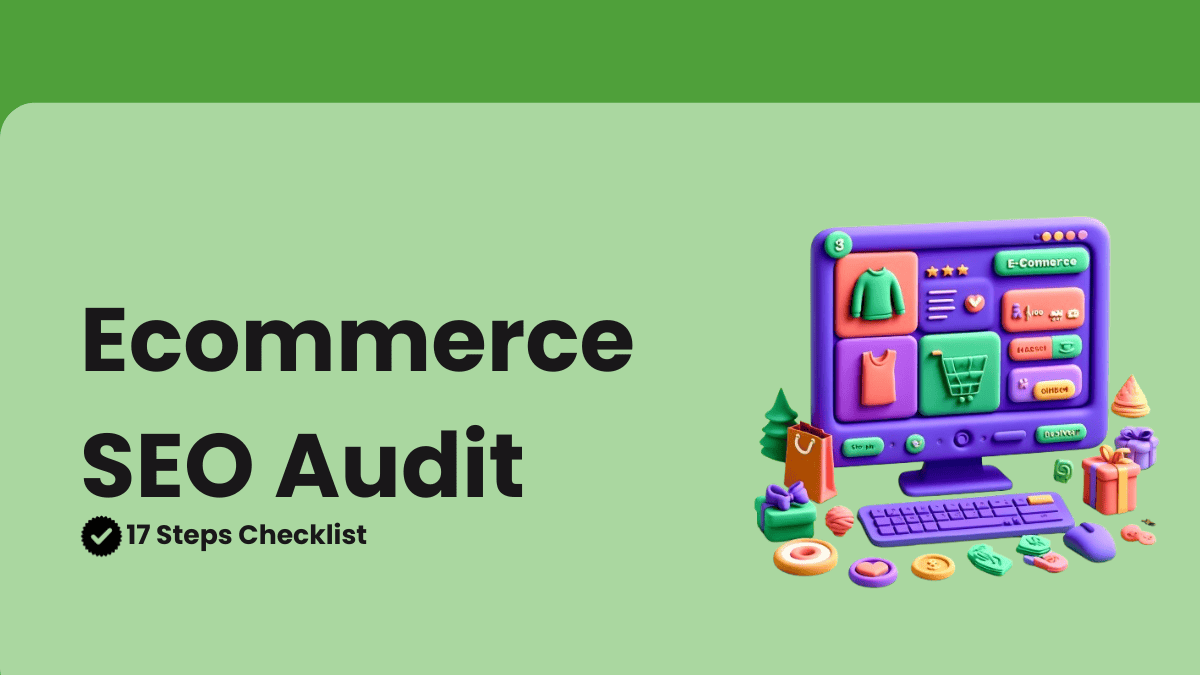
17 Steps to Perform an Ecommerce SEO Audit
If you want your online store to rank higher on search engines and attract more visitors, you need to do an ecommerce SEO audit. Here’s a step-by-step guide to help you improve your website:
Step 1: Check your crawlability and indexability
Search engines need to find and understand your website to show it in search results. Use tools like Google Search Console to:
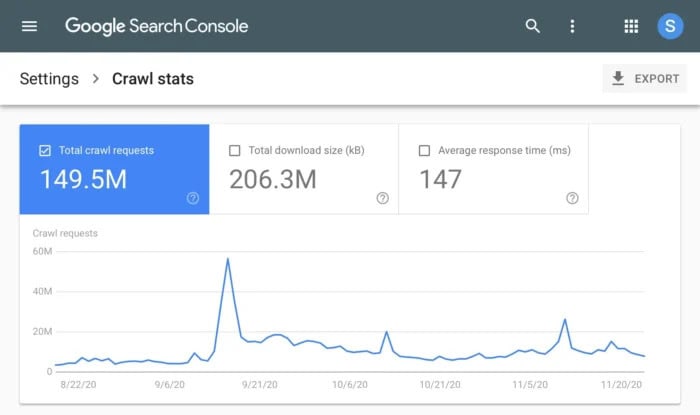
- Check for broken links (404 errors) or server problems (500 errors) and fix them.
- See which pages are indexed and ensure only important pages are included.
- Remove unnecessary pages like cart or checkout pages by using the noindex tag in your robots.txt file or meta tags.
Step 2: Evaluate core web vitals for better performance
Core Web Vitals measure your website’s loading speed and usability. They include:
- LCP (Largest Contentful Paint): How fast the main content of a page loads.
- FID (First Input Delay): How quickly the website responds to user actions.
- CLS (Cumulative Layout Shift): How stable the page layout is while loading.
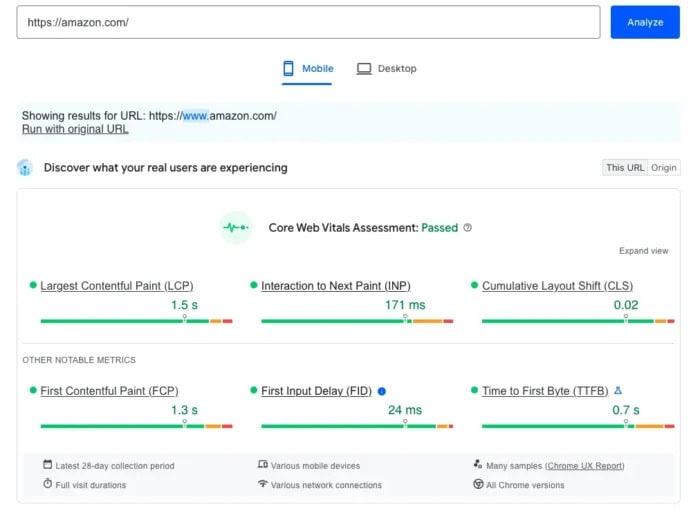
Use Google PageSpeed Insights to check and improve these metrics by optimizing images and reducing unused code.
Step 3: Ensure your sitemap and robots.txt are set up correctly
A sitemap is like a map of your website that helps search engines find all your important pages. A robots.txt file, on the other hand, tells search engines which parts of your ecommerce website to ignore.
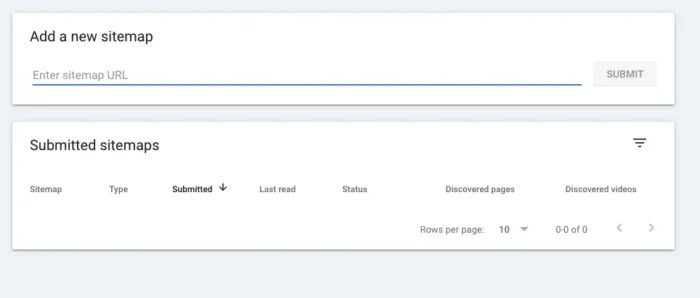
- Make sure your sitemap is complete and free of errors. Submit it to Google Search Console for faster indexing.
- Check your robots.txt file to ensure it blocks unimportant pages like log-in or search pages but allows essential ones to be crawled.
Step 4: Verify HTTPS for secure browsing
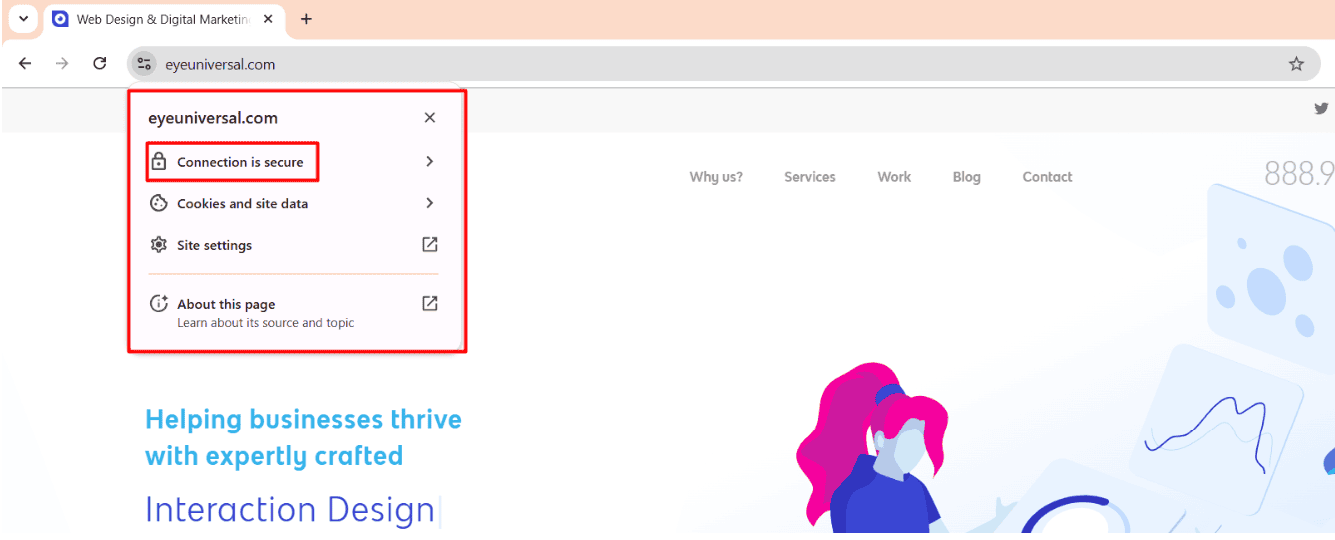 HTTPS encrypts your website data, making it secure. It helps protect customer information, builds trust, and boosts search rankings. To enable HTTPS:
- Install an SSL certificate.
- Update all website links from HTTP to HTTPS to avoid errors.
- Use the .htaccess file or use ‘Force https’ (WordPress) to redirect all links to HTTPS.

To check if it’s working, look for a lock or view site information icon in your browser’s address bar.
Step 5: Check for mobile friendliness
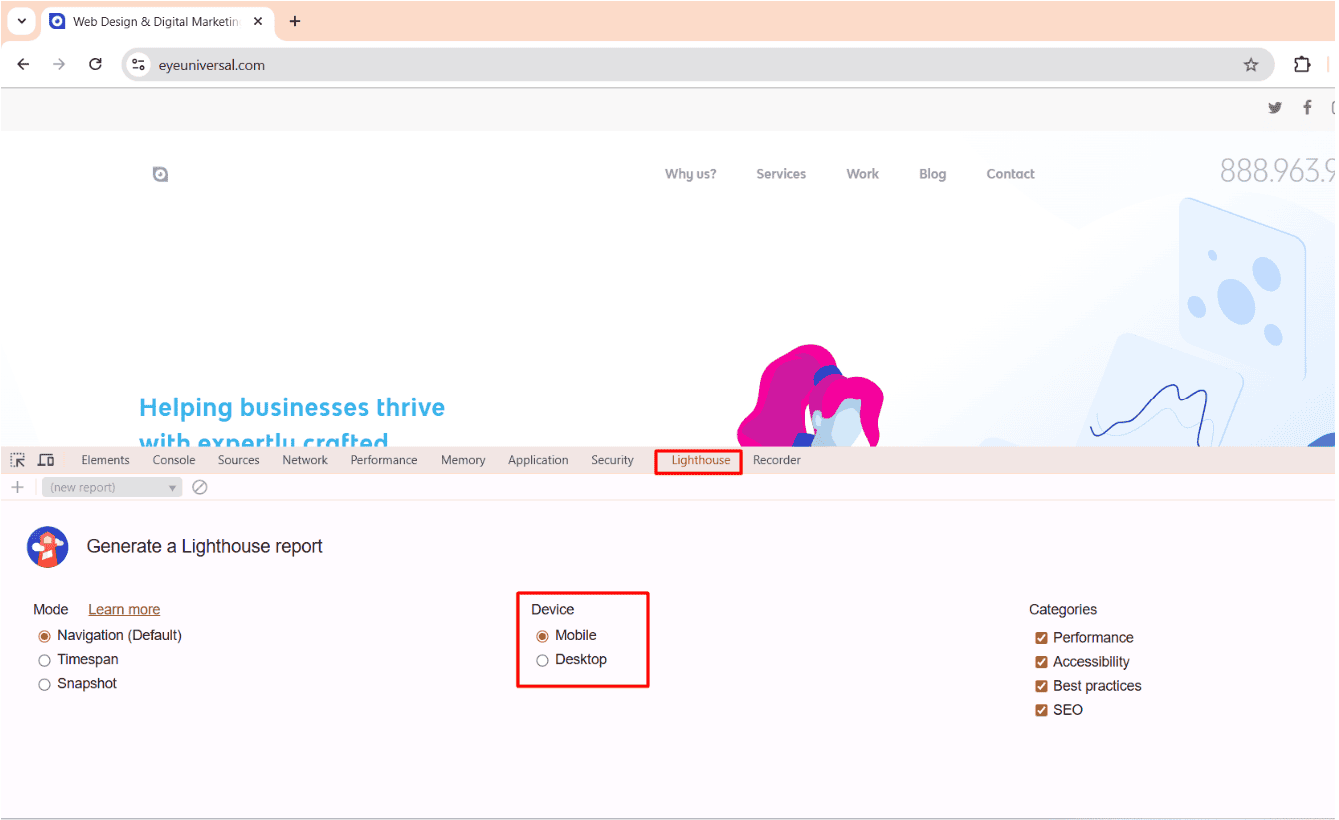
Since many people shop on their phones, your website should work well on mobile devices. Use Lighthouse from the Google Chrome Developer tool to check if:
- The text is easy to read.
- Buttons are large enough to click.
- Pages load quickly.
- The Viewport is set correctly
You can check the lighthouse report following the below steps:
For Mac:
Step 1: Open Google Chrome and navigate to the website you want to audit.
Step 2: Open DevTools:
- Press Command (⌘) + Option (⌥) + I to open Inspect Element.
- Or right-click on the page and select “Inspect”.
Step 3: Navigate to the Lighthouse tab:
- In DevTools, click the » (double arrow) if you don’t see the Lighthouse tab.
- Select Lighthouse from the dropdown.
Sep 4: Configure Lighthouse settings:
- Choose the categories you want to audit (Performance, Accessibility, SEO, etc.).
- Select the device type (Mobile or Desktop).
Step 5: Generate report:
- Click the “Analyze page load” or “Generate report” button.
Step 6: View report:
- The report will generate in the same tab.
- You can download it as an HTML file for future reference.
For Windows:
Step 1: Open Google Chrome and go to the target website.
Step 2: Open DevTools:
- Press Ctrl + Shift + I to open Inspect Element.
- Or right-click on the webpage and choose “Inspect”.
Step 3: Navigate to Lighthouse tab:
- Look for the Lighthouse tab in the DevTools panel.
- If it’s not visible, click the » icon and select Lighthouse.
Step 4: Set lighthouse preferences:
- Select relevant audit categories (Performance, SEO, Accessibility, Best Practices, PWA).
- Choose Mobile or Desktop for the device type.
Step 6: Run the report:
- Click “Analyze page load” or “Generate report”.
Step 7: Access report:
- Review the report displayed in the browser.
- Use the Download button to save it locally if needed.
Step 6: Fix broken links
At least 66.5% of links to sites have been lost in the last 9 years. Broken links are links on your website that don’t work anymore. Broken links frustrate visitors and harm SEO. Use tools like Ahrefs’ Broken Link Checker to find them. Fix them by:
- Updating the link to a working page.
- Redirecting it to a similar page using a 301 redirect.
Step 7: Tackle duplicate content
Duplicate content means having similar or identical information on multiple pages of your website. This often happens with product descriptions or filtered category pages. While it doesn’t directly harm your website, it can confuse search engines about which page to show in search results.
Use tools like Screaming Frog or Grammarly to find duplicate content. To fix it, you can add a canonical tag, which tells search engines which page is the main one to focus on. This helps your ecommerce website appear more organized and makes it easier for search engines to index the right pages.
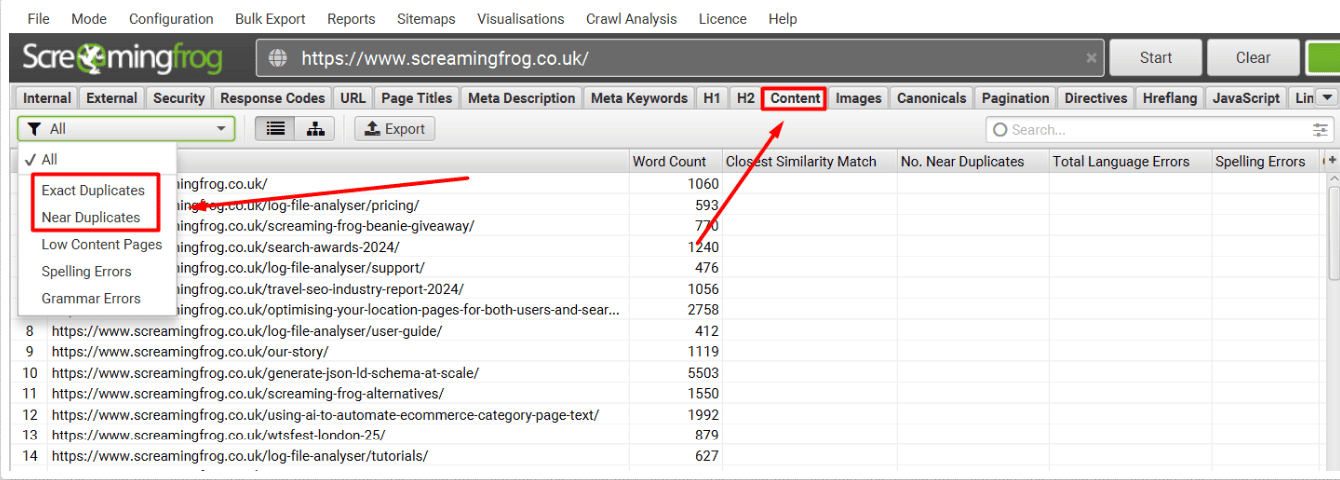
Steps to check duplicate content using ScreamingFrog:
Step 1: Crawl your website
Launch the SEO Spider tool in ScreamingFrog and run a crawl of your website.
Step 2: Access duplicate content
Navigate to the ‘Content’ tab. From the dropdown menu, select either ‘Near Duplicates’ or ‘Exact Duplicates’ based on your analysis needs.
Step 3:Analyze duplicate content results
Review the identified duplicate content listed in the results section.
Step 4: Run crawl analysis
Perform a Crawl Analysis to get detailed insights into the duplicate content detected.
Step 5: View duplicate details
Go to the ‘Duplicate Details’ section to examine specific instances of duplicate content.
Step 6: Download bulk duplicate reports
Export the complete list of duplicates by downloading the bulk duplicate reports for further analysis or record-keeping.
Step 8: Optimize title tags & meta descriptions
Title tags and meta descriptions help search engines and visitors understand your pages. Make them:
- Short and engaging (titles under 60 characters, meta descriptions under 160 characters).
- Keyword-rich and relevant.
Step 9: Check your category and product pages
Well-organized category and product pages make it easier for visitors to find what they need. A good organization helps:
- Improve user experience and navigation.
- Reduce bounce rates and increase sales.
- Allow search engines to understand your website structure better.
Step 10: Improve internal links
Internal links connect different pages on your website. This helps visitors find related products and improves SEO. Make sure to:
- Link relevant product pages in blog posts.
- Add breadcrumbs for easier navigation.
Also, look for pages that aren’t linked anywhere (called “orphan pages”) and add links to them where it makes sense. Breadcrumbs are another way to improve navigation by showing users where they are on your site.
Step 11: Optimize product pages
Your product pages are key to conversions. Improve them by:
- Using clear, keyword-rich titles and descriptions. For example, instead of “Shoes,” write “Comfortable Running Shoes for Men – Lightweight and Durable.”
- Adding structured data for prices and availability.
- Writing detailed, high-quality product descriptions that highlight features, benefits, and use cases.
Step 12: Add or fix alt text for images
Alt text helps search engines understand your images and improves accessibility. Instead of “shoes,” write “black running shoes with white soles.”
Step 13: Check and improve backlinks
Backlinks are links to your website from other sites. They’re like votes of confidence that tell search engines your ecommerce website is trustworthy. 96% of websites ranking in the top 10 on Google have more than 1,000 links from unique domains.
Backlinks from other websites improve your ranking. Use Ahrefs or SEMrush to check backlinks. Improve them by:
- Writing valuable blog posts others will link to.
- Guest posting on industry websites.
Removing spammy links using Google’s Disavow Tool.
Step 14: Find and fix content gaps
Content gaps happen when your ecommerce website doesn’t answer questions or cover topics your audience is searching for.
To find these gaps, use tools like AnswerThePublic or Ahrefs’ Content Gap feature. For example, if you sell hiking gear but don’t have a blog post on “How to Choose the Best Hiking Boots,” that’s a gap you can fill.
By creating content that solves problems or answers questions, you can attract more visitors and build trust with your audience.
Step 15: Handle URL parameters properly
URL parameters (like ?color=red) can create duplicate pages. Prevent SEO issues by:
- Specifying preferred URLs in Google Search Console.
- Use canonical tags to indicate the main page.
- With Robots.txt file to block crawling bots from accessing these URL parameters.
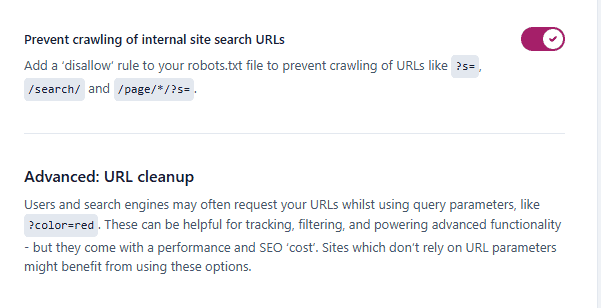
Some SEO tools like Yoast SEO also provide the option to do this more effectively.
Step 16: Fix pagination issues
Pagination (page 1, page 2, etc.) can cause SEO problems if not handled correctly. Fix this by:
- Using rel=prev and rel=next tags to help search engines understand page sequences.
- Ensuring each page has unique content and avoids duplicate title tags.
Step 17: Implement Hreflang tags for multilingual websites
If your website serves multiple languages or countries, use hreflang tags to help search engines show the correct language version to users.
FAQs
Are SEO audits worth it for online stores?
Yes, SEO audits are very useful for online stores! They help identify issues that could prevent your store from ranking well on search engines like Google. An audit also suggests ways to make your website faster, more user-friendly, and easier for customers to find.
Fixing these problems can bring more visitors, boost sales, and keep you ahead of competitors. It’s like a health check-up to keep your website performing at its best!
What are UR and DR in SEO for ecommerce?
In eCommerce SEO:
- UR (URL Rating) measures how strong a single page is based on links pointing to it.
- DR (Domain Rating) measures the overall strength of the entire website based on all its links.
Both help determine how well your site or pages can rank on search engines.
What is the difference between a website SEO audit and an ecommerce SEO audit?
A Website SEO Audit focuses on improving a website’s overall visibility and performance for general purposes, such as blogs, services, or portfolios. It checks things like site speed, structure, and keyword use. An ecommerce SEO Audit is specific to online stores. It focuses on optimizing product and category pages, improving site navigation, and boosting conversions by ensuring customers can easily find and buy products.
Conclusion
An ecommerce SEO audit helps you find what’s working and what needs fixing on your online store. It shows how to improve your website so it ranks better on search engines.
By checking technical SEO, keeping an eye on your site, and studying competitors, you can spot issues early and find ways to grow. An audit helps you get more traffic and sales by uncovering hidden opportunities.
SEO takes time, but with regular updates, your store will rank higher and give customers a better experience. Start small, stay steady, and see your store grow!